Version 7.0.2a - 2012-06 Update
Changes in this version of the model affect model run time as explained below. Model results remain unchanged.
Cube Cluster
Cube Cluster was added to improve model run times. Cluster allows model processes to be distributed over multiple computer processors, thus dividing the amount of work done on any one processor and reducing run time. Depending on the number of processing nodes over which the model will be distributed, the run time can be greatly reduced.
Implementation of Cluster & Model Run Time Reduction
Not all parts of the model are able to use Cluster. Figure 1 illustrates which scripts (shown in green) have Cluster coded into the model.

Because some parts of the model are not distributed over multiple processors, there is a minimum time the model will take to run and at which point adding more processors does not significantly improve model run times. A test of v7.0.2a on a computer with 32 processors showed the following model run time improvements when adding subsequent processing nodes:
Setting Cluster Controls
The following controls were added to the ‘1ControlCenter.block’ file to allow the user the ability to turn on/off Cluster and to set the Cluster parameters (note, Citilabs charges an additional fee for Cluster, so the model was made to run with or without Cluster):
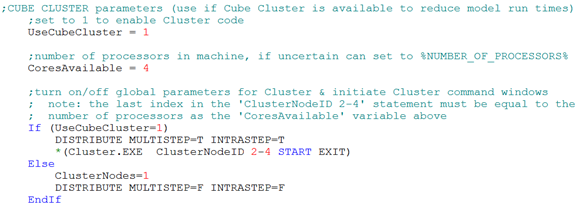
To turn on Cube Cluster, set the ‘UseCubeCluster’ variable to 1. If the variable is set to any other number the Cluster code in the model is ignored. The default is set to not run Cluster.
The ‘CoresAvailable’ variable identifies the number of extra processing nodes over which the model processing will be distributed. Typically this is set to the number of processors, or processing cores, available in a given machine. If the user wishes to not use all the available processors available in a computer, then this variable would be set to the number of processing cores the user wants Cluster to use. The user must also change the second index in the ‘ClusterNodeID 2-4’ statement (in this example the index is 4), to be the number of cores specified in the ‘CoresAvailable’ variable. If only 1 processing node is to be used, then Cluster should be turned off.
The ‘If’ statement is the last control and directs Cube to either turn Cluster on/off. If Cluster is to be turned on, then the ‘Cluster Node Management‘ window is initiated which sets number of Voyager processing nodes in wait mode. A control was also added to the ’HailMary.s’ script which closes these additional Voyager processing node windows when the model has completed running.
Elapsed Time Scripts
To be able to better track Cluster results script by script, an elapsed time text file is printed for each script in the model. The code that prints the elapsed time text file was updated was also updated so time stamps are printed in a similar fashion in each script.